Share to be shared__

Generic selectors
Exact matches only
Search in title
Search in content
Post Type Selectors
hsm-2019-badge-1024ppx

Integrated CAM for SOLIDWORKS

Introduction

Autodesk HSMWorks 2019 is an integrated CAM (Computer-Aided Manufacturing) solution designed to work natively inside SOLIDWORKS, enabling designers and machinists to generate production-ready CNC toolpaths directly from their CAD models. By combining CAD and CAM in a unified environment, HSMWorks eliminates the need to export or convert models, streamlining the workflow from design to manufacturing. The software supports milling, turning, and mill-turn operations, making it a versatile choice for a variety of manufacturing scenarios — from simple parts to complex multi-axis machining.

Key Features

  • Full integration with SOLIDWORKS — no need to switch between separate CAM and CAD applications.
  • Support for 2.5-axis, 3-axis, 3+2 indexing, and simultaneous 5-axis milling for complex geometries.
  • Turning and mill-turn capabilities, enabling lathe and combined lathe/mill operations.
  • Adaptive Clearing (high-speed machining) strategies to reduce machining time and extend tool life.
  • Powerful toolpath generation and post-processor support for a wide range of CNC machines/E controllers.
  • Integrated simulation and verification tools to detect collisions and verify machining sequences before production.
  • Automatic update of toolpaths when CAD model changes — keeping CAM data synchronized with design edits.
  • Support for both standard part machining and advanced, multi-axis, high-precision components for mold, automotive, aerospace, etc.
  • Compatibility with commonly used operating systems (Windows 7/8/8.1/10 64-bit) and multiple versions of SOLIDWORKS (2016–2019 supported by this release).

Conclusion

Autodesk HSMWorks 2019 delivers a robust and efficient CAM solution tightly integrated with SOLIDWORKS, ideal for manufacturers needing precise, high-quality CNC programming without leaving the CAD environment. Its support for milling, turning, and multi-axis machining plus advanced toolpath strategies like Adaptive Clearing make it suitable for both everyday mechanical parts and complex components. For companies or workshops focused on accuracy, speed, and workflow efficiency, HSMWorks 2019 remains a highly effective choice.

System Requirements

  • Operating System: Windows 7 (64-bit), Windows 8 / 8.1 (64-bit), or Windows 10 (64-bit)
  • Host CAD Software: SOLIDWORKS 2016, 2017, 2018 or 2019
  • CPU: 64-bit Intel or AMD multi-core processor
  • RAM: 8 GB minimum (more recommended for complex multi-axis machining)
  • Disk Space: Approx. 2 GB free for installation
  • CNC Machine & Post-Processor: Compatible post-processor for target CNC machine required for code generation
purchase-autodesk-inventor-hsm-2018-ultimate-online

Integrated CAD/CAM for CNC machining

Introduction

Autodesk HSMWorks Ultimate 2018 is a professional integrated CAM solution designed exclusively for SolidWorks users who require advanced machining capabilities. Built to streamline the manufacturing workflow, the software delivers powerful 2.5D, 3D, and 5-axis milling strategies while maintaining a fully associative relationship with SolidWorks models. This enables engineers and machinists to generate reliable toolpaths faster, reduce programming errors, and improve overall machining efficiency. With its intuitive interface and optimized kernel, HSMWorks Ultimate is widely used across CNC workshops, mold manufacturers, and precision engineering industries.

Key Features

  • Seamless and native integration with SolidWorks, allowing direct work on the CAD model.
  • Advanced 3D and 5-axis toolpath generation for high-precision machining tasks.
  • Adaptive Clearing technology that reduces machining time and tool wear significantly.
  • High-performance simulation tools for verifying toolpaths and preventing collisions.
  • Automated workflows and templates for faster repetitive job setup.
  • Support for probing operations and multi-axis positioning.
  • High-quality post-processors and customization options for a wide range of CNC machines.

Conclusion

Autodesk HSMWorks Ultimate 2018 is a robust CAM platform tailored for manufacturing professionals who expect precision, speed, and efficiency directly inside the SolidWorks environment. Its advanced machining algorithms, reliable simulation tools, and adaptive milling technology help organizations shorten production cycles and enhance machining accuracy. For CNC-driven industries seeking a unified CAD/CAM workflow, HSMWorks Ultimate 2018 remains a compelling and highly trusted solution.

System Requirements

  • Operating System: Windows 7 SP1 / 8.1 / 10 (64-bit)
  • SolidWorks: Version 2016, 2017, or 2018
  • CPU: 64-bit Intel or AMD multi-core processor
  • RAM: Minimum 8 GB (16 GB recommended)
  • GPU: OpenGL-compatible graphics card
  • Storage: 6 GB of free disk space
26add3

Premium DVD and Blu-ray cloning suite

Introduction

DVD-Cloner XR Platinum 22 is a professional-grade disc copying and backup solution designed for users who need reliable tools to clone, burn, decrypt, and convert DVD/Blu-ray discs. Built for both home enthusiasts and professional archivists, it supports 1:1 lossless copying, movie-only mode, customized compression, and multi-format output. With enhanced decryption capabilities, the software can back up most commercial discs, ensuring long-term preservation of collections and compatibility with modern playback devices. Its streamlined interface and powerful engine make DVD-Cloner XR Platinum 22 one of the most advanced disc backup suites available.

Key Features

  • 1:1 lossless cloning of DVD and Blu-ray discs, preserving menus, audio tracks, and subtitles.
  • Movie-only copy mode for removing extra content, trailers, or unwanted features.
  • Advanced decryption engine to bypass most disc protections for backup purposes.
  • Compress large Blu-ray/DVD content to fit standard-sized blank discs without quality loss.
  • Split or merge discs, ideal for large movies or multi-disc combinations.
  • Create ISO files and burn them back to DVD/Blu-ray with high compatibility.
  • Ripping feature allows converting disc content into MP4, MKV, AVI, and other digital formats.
  • Supports DVD-9 to DVD-5, BD-50 to BD-25, and BD to MKV conversions.
  • Multi-core CPU acceleration for faster processing and reduced waiting time.
  • User-friendly interface designed for both beginners and advanced disc backup users.

Conclusion

DVD-Cloner XR Platinum 22 provides a powerful, flexible, and easy-to-use platform for backing up and copying disc media. With strong decryption capabilities, format conversion, and high-speed cloning performance, it is an excellent choice for maintaining movie libraries, archiving physical media, or creating digital backups for modern playback devices. Whether used casually or in professional workflows, the software delivers dependable results with high-quality output.

System Requirements

  • Operating System: Windows 7, 8, 8.1, 10, 11 (64-bit recommended)
  • CPU: Intel/AMD dual-core processor or higher
  • RAM: Minimum 2 GB (4 GB recommended)
  • Disk Space: Minimum 50 GB free space for Blu-ray processing
  • Optical Drive: DVD and/or Blu-ray burner for reading and writing
3

Advanced driver updater and backup tool

Introduction

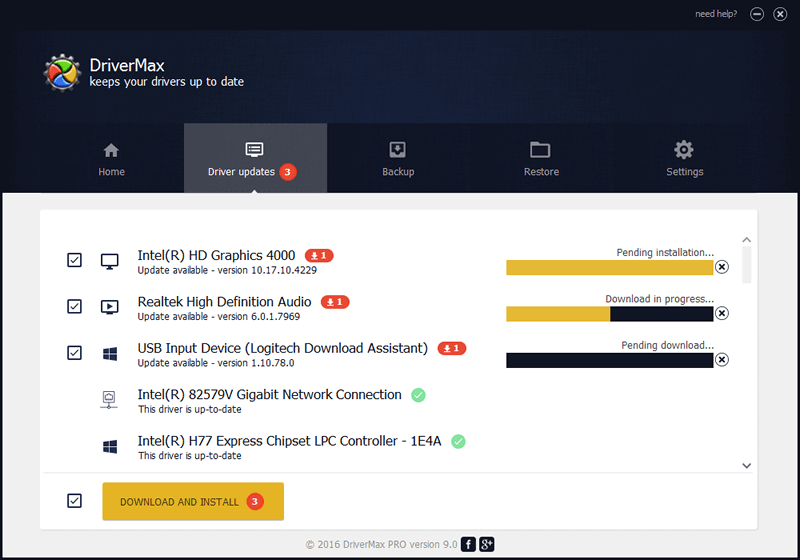
DriverMax Pro 16 is a comprehensive driver management solution designed to automatically detect, update, back up, and restore drivers on Windows systems. For users who want stable performance, fewer system errors, and maximum hardware compatibility, DriverMax Pro offers an efficient all-in-one environment. The software maintains a massive driver database, ensuring users always have access to the latest and most compatible drivers for their hardware. It is ideal for home users, IT technicians, and professionals who need a reliable method to keep systems updated and functioning smoothly.

Key Features

  • Automatic detection and updating of outdated, missing, or malfunctioning drivers.
  • Extensive online driver database covering millions of devices and hardware components.
  • Create full driver backups, allowing safe restoration after reinstalling Windows or hardware failures.
  • One-click installation for all required drivers, reducing manual setup time.
  • Scheduled driver scans that keep systems updated without user intervention.
  • Secure driver downloads verified for compatibility and malware-free integrity.
  • Roll-back option to restore previously working drivers if compatibility issues arise.
  • Fast driver installation engine that minimizes downtime during updates.
  • Ideal for fresh OS installations, hardware upgrades, and system maintenance.
  • User-friendly dashboard suitable for both beginners and advanced Windows users.

Conclusion

DriverMax Pro 16 is a powerful and dependable tool for maintaining system stability through automated driver updates and comprehensive driver backup options. By ensuring that hardware components operate with the latest verified drivers, the software enhances overall performance, reduces system errors, and improves device compatibility. Whether you are optimizing a personal PC or managing multiple systems in a technical environment, DriverMax Pro 16 provides a streamlined and professional driver management experience.

System Requirements

  • Operating System: Windows 7, 8, 8.1, 10, 11 (32-bit & 64-bit)
  • CPU: Intel/AMD processor with 1 GHz or higher
  • RAM: Minimum 2 GB
  • Disk Space: Around 50 MB for installation
  • Internet Connection: Required for downloading updated drivers
2024_3_1_638449257400463568_diskdigger-photo-recovery-1-1

Powerful file and photo recovery tool

Introduction

DiskDigger 2 is a lightweight yet powerful data recovery tool designed to restore deleted files, photos, videos, documents, and other data from hard drives, USB flash drives, memory cards, and numerous storage devices. Known for its simplicity and effectiveness, DiskDigger offers two recovery modes—“Dig Deep” and “Dig Deeper”—allowing users to scan both file system metadata and raw disk sectors. The software is ideal for home users, IT technicians, and professionals who need a fast, straightforward recovery solution without complex setup or configurations.

Key Features

  • Recover deleted photos, videos, documents, audio files, archives, and over 300 file formats.
  • Two recovery modes:
    • Dig Deep: Quick scanning based on the file system.
    • Dig Deeper: Thorough sector-by-sector scan for heavily damaged or formatted drives.
  • Supports FAT, exFAT, NTFS, and other common file systems.
  • Restore data from HDD, SSD, USB drives, SD cards, microSD, digital cameras, and Android devices (with root access).
  • Preview files before recovery to ensure correct selection.
  • Recover files even after accidental deletion, formatting, corruption, or partition errors.
  • Portable version available—run without installation for emergency recovery.
  • Filtering and sorting tools for large scan results, making it easier to find lost data.
  • Option to save recovered files to any safe location or upload directly via FTP.
  • User-friendly interface suitable for both beginners and advanced users.

Conclusion

DiskDigger 2 is a highly effective recovery utility designed for anyone needing quick and reliable file restoration. Its dual scan modes offer flexibility for both simple undelete scenarios and deep forensic-level recovery. Whether you’re rescuing accidentally deleted photos or recovering important files from a damaged drive, DiskDigger provides a clean, efficient, and dependable solution with minimal system resources.

System Requirements

  • Operating System: Windows XP, Vista, 7, 8, 10, 11 (32-bit & 64-bit)
  • CPU: Intel/AMD 1 GHz or faster
  • RAM: Minimum 1 GB
  • Disk Space: Around 20 MB for installation (additional space for recovered files)
  • Storage Device: Any FAT, exFAT, or NTFS drive supported
Capture-One-23-Enterprise-v16.7.0.3201.png

Professional enterprise-grade photo workflow

Introduction

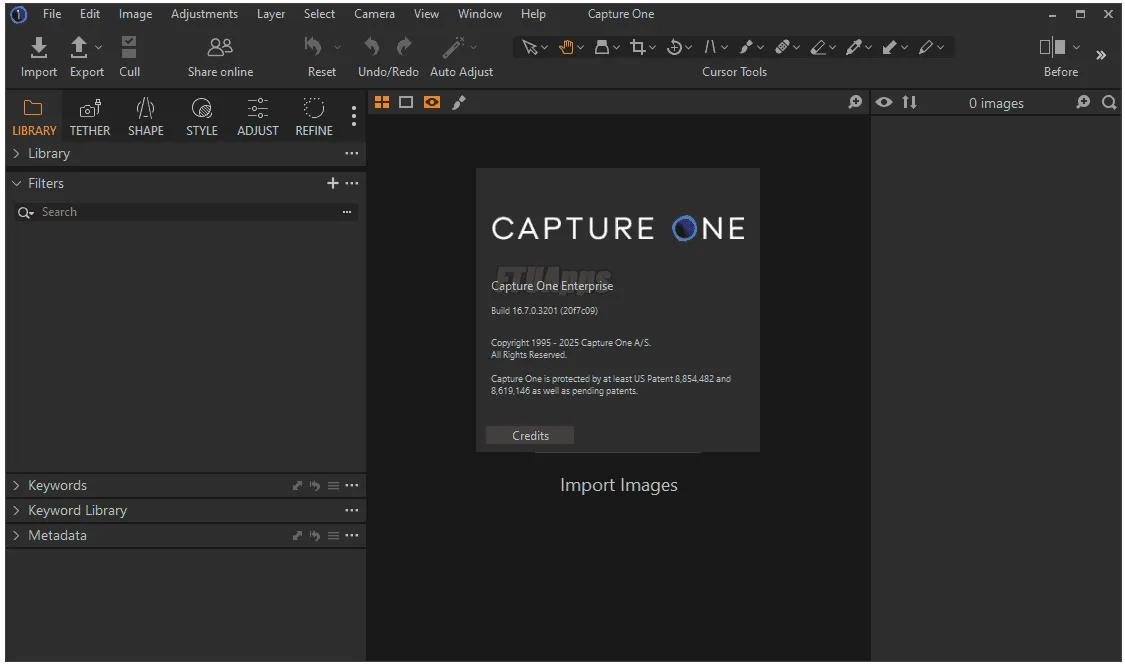
Capture One 23 Enterprise 16 is a high-end photo editing and workflow management solution engineered specifically for large studios, e-commerce teams, and enterprise-level photography environments. Known for its superior RAW processing engine, color accuracy, and tethered capture performance, Capture One Enterprise extends the capabilities of the standard edition with additional automation, workflow control, and scalable management features. It is designed to support high-volume production, multi-user teams, and professional studio automation with precision, speed, and reliability.

Key Features

  • Industry-leading RAW processing with exceptional color accuracy and dynamic range.
  • Tethered capture with instant preview, live view, overlays, composition grids, and automatic adjustments.
  • Enterprise tools: barcode scanner workflow, asset naming automation, session templates, and customizable metadata handling.
  • Advanced color grading tools including Color Editor, Skin Tone Equalizer, HDR tools, and layers-based adjustments.
  • High-volume production support with automated renaming, batch processing, and workflow macros.
  • Multi-user collaboration with centralized asset pipelines and consistent color profiles across teams.
  • Integrations with studio automation tools, DAM systems, and third-party production platforms.
  • Powerful masking tools such as AI Select, Refine Mask, Luma Mask, and Style Brushes.
  • Session-based workflow ideal for product photography, fashion studios, and catalog production.
  • Supports hundreds of camera models including Phase One, Sony, Nikon, Canon, Fujifilm, and more.

Conclusion

Capture One 23 Enterprise 16 is a robust and highly scalable platform built for demanding photography operations that require precision, consistency, and automation. Its advanced color engine, industry-leading tethering speed, and enterprise-only workflow tools make it an indispensable solution for large studios handling thousands of images per day. From product photography to fashion and commercial work, the Enterprise edition enables teams to work faster, more accurately, and with complete production control.

System Requirements

  • Operating System: Windows 10 or 11 (64-bit) / macOS 10.15 or later
  • CPU: Intel or AMD with SSE4.2 support / Apple Silicon supported natively
  • RAM: Minimum 8 GB (16 GB recommended for large sessions)
  • GPU: Dedicated GPU with 2 GB VRAM or more recommended
  • Disk Space: 10 GB free space for installation and cache
  • Monitor: 1280×800 minimum (1920×1080 or higher recommended)

Chat Now

Community Chat

Enter your email and message to join the conversation. Messages are public.

I
inf*
2025-12-07 14:34:36
hello
I
inf*
2025-12-07 17:00:39
update Autodesk HSMWorks Ultimate 2019

Most Download & Stast

📄 Posts
163
💬 Comments
2
👁 Total Views
14,777

New Comment

Recent Comments

Latest discussions from your posts.

H
Ho Quang Dai View post
on IDimager Photo Supreme 2025.3.3.8136
“LIKE”
A
Alex Rivera View post
on IDimager Photo Supreme 2025.3.3.8136
“Interesting piece on Photo Supreme 2025, shows how robust DAM needs to be for fast-paced studios. I …”

Category

Tag Cloud

Request Software